
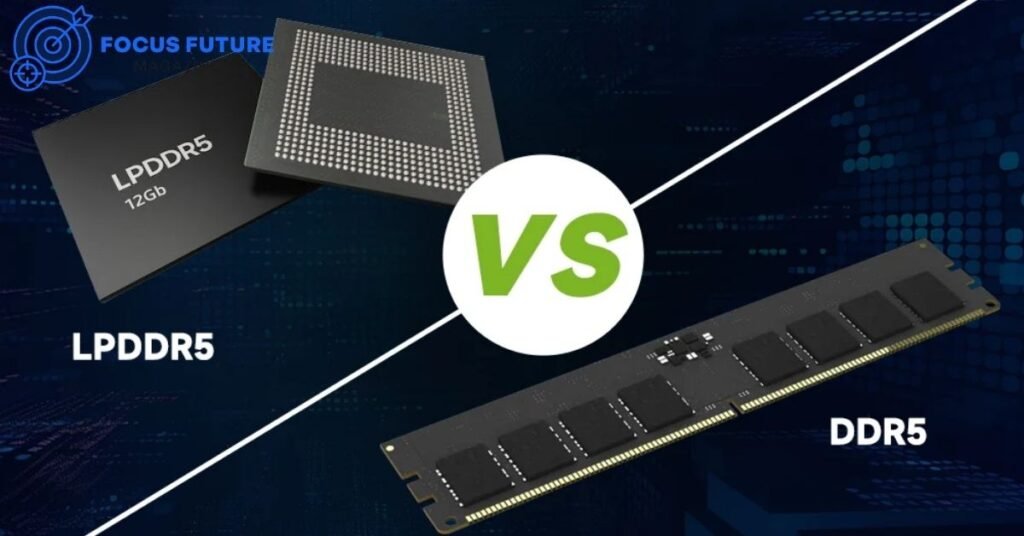
If you’re shopping for a new laptop, you’ve probably run into the LPDDR5 vs DDR5 question more than once. Both are fifth-generation DRAM standards, but they’re built for very different jobs. LPDDR5 (and its faster sibling, LPDDR5X) is designed for mobile devices where battery life and thin designs matter most. DDR5 is built for desktops and upgradeable laptops where raw capacity and long-term flexibility come first. Understanding the LPDDR5 vs DDR5 difference can save you from overpaying for memory speed your CPU can’t fully use, or from buying a laptop you can’t upgrade later.
This guide breaks down everything you need to know about LPDDR5 vs DDR5 — speed, power draw, battery impact, gaming performance, AI workloads, and upgradeability — so you can make a confident choice.
What Are DDR5 and LPDDR5?
DDR5 and LPDDR5 are both fifth-generation double data rate memory standards, but they solve different problems. DDR5 is the successor to DDR4 and is used in desktops, workstations, servers, and many laptops through SO-DIMM modules. It’s built for maximum capacity, compatibility, and serviceability.
LPDDR5 stands for Low Power DDR5. It’s engineered specifically for smartphones, tablets, ultrabooks, and now AI PCs, where power efficiency and compact packaging matter more than raw expandability. LPDDR5X is an enhanced version of LPDDR5 that pushes speeds even higher while keeping power draw low. When people compare LPDDR5 vs DDR5, they’re really weighing efficiency and portability against flexibility and capacity.
How DDR5 and LPDDR5 Differ by Design
The core LPDDR5 vs DDR5 distinction comes down to packaging and purpose. DDR5 typically ships as removable SO-DIMM or UDIMM modules that slot into a socket, meaning you can swap or upgrade them later. LPDDR5 chips are soldered directly onto the motherboard using BGA (Ball Grid Array) or PoP (Package on Package) packaging.
This design choice ripples into everything else. Soldering LPDDR5 close to the processor shortens the electrical path, which helps with both speed and power efficiency. DDR5’s socketed design trades some of that efficiency for the ability to add more memory or replace faulty modules down the road. Both standards support on-die ECC (error correction), but LPDDR5 pairs it with mobile-specific power features like partial array self-refresh and dynamic voltage and frequency scaling (DVFS).
Speed, Bandwidth, and Latency Explained
When comparing LPDDR5 vs DDR5 speeds, the numbers can be confusing because “faster” depends on which metric you’re looking at. LPDDR5X mainstream speeds in 2026 typically sit between 7,500 and 8,533 MT/s, with some manufacturers sampling 9,600–10,667 MT/s versions under the LPDDR5T naming. DDR5 laptop kits, by contrast, commonly run at 5,200–5,600 MT/s under JEDEC standards, though high-end desktop kits with XMP or EXPO profiles can reach 8,800 MT/s or higher.
That means LPDDR5X often beats typical laptop DDR5 in raw bandwidth. Bandwidth-wise, LPDDR5X can reach roughly 68.3 GB/s per package, while DDR5 can hit around 70.4 GB/s per module in dual-channel setups — the two are closer than the MT/s numbers alone suggest. Latency tells a slightly different story. DDR5-4800 typically runs at 15.8–16.7 nanoseconds, DDR5-6400 drops to about 12.5–14.4 nanoseconds, and LPDDR5-6400 lands somewhere around 12.5–15.6 nanoseconds depending on configuration. In short, DDR5 often has the latency edge, while LPDDR5X wins on bandwidth per watt.
| Feature | DDR5 (SO-DIMM/UDIMM) | LPDDR5 | LPDDR5X |
|---|---|---|---|
| Data rate | 5,200–8,800+ MT/s | Up to ~6,400 MT/s | 7,500–10,667 MT/s |
| Voltage | ~1.1V | ~0.5–0.6V | ~0.5–0.6V |
| Packaging | DIMM/SO-DIMM | BGA/PoP (soldered) | BGA/PoP (soldered) |
| Upgradeability | Yes | No (except LPCAMM2) | No (except LPCAMM2) |
| Typical devices | Desktops, workstations, some laptops | Smartphones, tablets | Ultrabooks, AI PCs |
| ECC support | On-die ECC | On-die ECC | On-die ECC |
Power Consumption and Battery Life
Power efficiency is where the LPDDR5 vs DDR5 gap is most obvious. DDR5 runs at roughly 1.1V, while LPDDR5 and LPDDR5X operate at just 0.5–0.6V. That lower voltage, combined with mobile-focused power management features, translates into real battery savings. Laptops using LPDDR5 can offer roughly 30–40% longer battery life than comparable DDR5 machines in light-load scenarios like web browsing or document editing.
LPDDR5X itself is also about 20% more power-efficient than earlier LPDDR5 generations, thanks to refinements like same-bank refresh and improved dynamic voltage scaling. This is a major reason why thin-and-light laptops and AI PCs almost always choose LPDDR5X over DDR5 — every milliwatt saved on memory adds up over a full day of use.
Packaging: Soldered vs Socketed Memory
The physical packaging is arguably the most practical difference in the LPDDR5 vs DDR5 comparison for everyday buyers. LPDDR5 chips are soldered directly to the board next to the processor, which reduces signal distance, improves power efficiency, and allows for thinner laptop designs. The trade-off is that soldered memory can’t be removed or upgraded.
DDR5, when used in SO-DIMM form, sits in a socket you can access and swap out. This is common in business laptops, workstations, and many gaming laptops. If a stick fails, you replace it; if you need more capacity, you add it. This flexibility comes at the cost of a slightly larger footprint and marginally higher power draw compared to soldered LPDDR5.
Upgradeability and Repairability
Upgradeability is one of the biggest deciding factors when people weigh LPDDR5 vs DDR5 for a new laptop purchase. Because LPDDR5 is soldered, what you buy is what you’re stuck with — there’s no adding more RAM two years later. DDR5 SO-DIMM laptops let you open a hatch, remove the old sticks, and install higher-capacity ones, assuming the motherboard and CPU support it.
There is a middle ground emerging: LPCAMM2, a modular memory standard that lets manufacturers use replaceable LPDDR5/LPDDR5X modules instead of soldering them. It’s still limited to select premium laptops, but it’s a meaningful step toward combining LPDDR5’s efficiency with DDR5-style upgradeability. If future-proofing matters to you, checking whether a laptop supports LPCAMM2 is worth the extra few minutes of research.
Gaming Performance: DDR5 vs LPDDR5
For gaming, the LPDDR5 vs DDR5 answer depends heavily on whether you’re using a discrete GPU or relying on integrated graphics. With a dedicated GPU, memory type matters less — the GPU has its own dedicated VRAM, so system memory mostly affects CPU-side tasks like asset streaming and background processes. Here, DDR5’s lower latency and higher capacity ceiling can help with sustained, CPU-heavy gaming sessions.
For thin-and-light laptops or AI PCs running on integrated graphics, the story flips. LPDDR5X’s higher bandwidth becomes a real asset because integrated GPUs borrow system memory to act as video memory. In that scenario, a laptop with fast LPDDR5X can noticeably outperform one with slower DDR5, even if the DDR5 laptop has a higher MT/s badge on paper — as long as it’s actually running at that speed rather than a lower JEDEC default.
Integrated Graphics and Memory Bandwidth
Integrated GPUs are especially sensitive to memory bandwidth, which is another reason the LPDDR5 vs DDR5 conversation matters for buyers who aren’t getting a discrete graphics card. Since integrated GPUs from Intel Arc, AMD Radeon, and Apple Silicon all pull from system RAM, faster memory directly improves frame rates and rendering speed in creative apps.
Many budget and mid-range laptops ship with DDR5 running at only 5,200–5,600 MT/s, which can bottleneck an otherwise capable integrated GPU. LPDDR5X running at 7,500 MT/s or higher can close that gap significantly, sometimes even matching entry-level discrete graphics performance in less demanding titles or creative workloads.
AI Workloads and On-Device Inference
AI PCs have made the LPDDR5 vs DDR5 debate even more relevant. On-device large language models, image generation, and voice processing all lean heavily on memory bandwidth and power efficiency, which plays directly into LPDDR5X’s strengths. Its combination of high bandwidth and low voltage makes it well-suited for local inference tasks without draining the battery.
For large-scale AI training, however, desktop and server-class DDR5 — or dedicated GPU memory like HBM — remains far more relevant, since training workloads need massive capacity and sustained throughput rather than power efficiency. So for everyday AI PC features like local chatbots or photo enhancement, LPDDR5X tends to be the better fit; for serious model training, DDR5-based workstations are still the standard.
Cost, Longevity, and System Design
Price is a practical part of any LPDDR5 vs DDR5 decision. DDR5 SO-DIMM systems can be cheaper to maintain long-term since you can upgrade instead of replacing the whole machine. LPDDR5X laptops often cost more upfront for higher capacities since you must choose the right configuration at purchase — there’s no adding more later.
It’s also worth remembering that memory speed alone doesn’t determine real-world performance. A CPU’s memory controller has a supported speed ceiling, and running memory faster than that ceiling provides minimal benefit. Cooling, CPU thermal design power, and storage speed often matter more to everyday performance than shaving a few nanoseconds off memory latency.
DDR5 vs LPDDR5X: Which Laptop Should You Buy in 2026?
The right choice in the LPDDR5 vs DDR5 debate really depends on how you use your laptop. If portability, battery life, and integrated graphics performance top your list, LPDDR5X is the clear winner. If you need maximum capacity, plan to upgrade later, or run sustained CPU-heavy workloads like compiling code or running virtual machines, DDR5 SO-DIMM is the safer bet.
| Use Case | DDR5 SO-DIMM | LPDDR5X |
|---|---|---|
| Battery life | Good | Excellent |
| Max RAM capacity | Higher (upgradeable) | Fixed at purchase |
| Upgradeability | Yes | No (except LPCAMM2) |
| iGPU gaming | Moderate | Strong |
| AI inference | Good | Excellent |
| Content creation | Strong (with more RAM) | Good |
| Thermal constraints | More flexible | Tighter in thin chassis |
Frequently Asked Questions
Is LPDDR5 faster than DDR5? It depends on the metric. LPDDR5X often runs at higher MT/s than typical laptop DDR5, giving it a bandwidth edge, but DDR5 can offer lower latency and higher peak speeds in desktop configurations with XMP or EXPO profiles.
Does LPDDR5 save more battery than DDR5? Yes. LPDDR5 operates at roughly half the voltage of DDR5 and includes mobile power-saving features, often delivering 30–40% longer battery life in light workloads.
Can you upgrade LPDDR5 RAM later? Generally no, since it’s soldered to the motherboard. Some newer laptops use LPCAMM2 modules to allow limited upgrades, but this is still uncommon outside premium models.
Which is better for gaming laptops? For laptops with a discrete GPU, DDR5’s capacity and latency advantages matter more. For thin-and-light laptops relying on integrated graphics, LPDDR5X’s bandwidth often provides better frame rates.
Does memory type affect integrated graphics? Yes. Integrated GPUs share system memory, so higher-bandwidth LPDDR5X can meaningfully boost performance compared to slower DDR5 configurations in the same chassis.
Is LPDDR5X good for AI tasks? Yes, especially for on-device inference like local chatbots and image processing. For large-scale AI model training, desktop or server-class DDR5 remains more suitable.
Conclusion
The LPDDR5 vs DDR5 choice isn’t about which memory is universally better — it’s about matching the technology to how you’ll actually use your device. LPDDR5 and LPDDR5X deliver excellent battery life, strong bandwidth for integrated graphics and on-device AI, and compact designs, but you lose the ability to upgrade later. DDR5 trades some power efficiency for flexibility, higher capacity ceilings, and easier repairs.
If you’re buying a thin, portable laptop or an AI PC and battery life is your priority, lean toward LPDDR5X. If you want a machine you can upgrade for years to come, or you run demanding, sustained workloads, DDR5 SO-DIMM is the more practical option. Either way, understanding the LPDDR5 vs DDR5 trade-offs before you buy means you won’t be caught off guard by soldered memory or underwhelming bandwidth down the line.